
解答本文疑问/技术咨询/运营咨询/技术建议/互联网交流
SQL Server自动化运维系列:监控性能指标脚本
2026-02-26 05:45 栏目: 常见问题 查看(
)
《SQL Server自动化运维系列:监控性能指标脚本》
《SQL Server自动化运维系列:监控磁盘剩余空间及SQL Server错误日志》
《SQL Server自动化运维系列:关于邮件通知那点事》
《SQL Server自动化运维系列:监控跑批Job运行状态》
《SQL Server自动化运维系列:关于数据收集》
需求描述
一般在生产环境中,有时候需要自动的检测指标值状态,如果发生异常,需要提前预警的,比如发邮件告知,该文就介绍如果通过Power shell实现状态值监控。
监控值范围
根据经验,作为DBA一般需要监控如下系统能行指标。
cpu:

    Processor(_Total)% Processor Time
    Processor(_Total)% Privileged Time

    SQLServer:SQL StatisticsBatch Requests/sec
    SQLServer:SQL StatisticsSQL Compilations/sec
    SQLServer:SQL StatisticsSQL Re-Compilations/sec
    SystemProcessor Queue Length
    SystemContext Switches/sec

  Memory:

    MemoryAvailable Bytes
    MemoryPages/sec
    MemoryPage Faults/sec
    MemoryPages Input/sec
    MemoryPages Output/sec
    Process(sqlservr)Private Bytes
    SQLServer:Buffer ManagerBuffer cache hit ratio
    SQLServer:Buffer ManagerPage life expectancy
    SQLServer:Buffer ManagerLazy writes/sec
    SQLServer:Memory ManagerMemory Grants Pending
    SQLServer:Memory ManagerTarget Server Memory (KB)
    SQLServer:Memory ManagerTotal Server Memory (KB)

  Disk:

    PhysicalDisk(_Total)% Disk Time
    PhysicalDisk(_Total)Current Disk Queue Length
    PhysicalDisk(_Total)Avg. Disk Queue Length
    PhysicalDisk(_Total)Disk Transfers/sec
    PhysicalDisk(_Total)Disk Bytes/sec
    PhysicalDisk(_Total)Avg. Disk sec/Read
    PhysicalDisk(_Total)Avg. Disk sec/Write

  SQL Server:

    SQLServer:Access MethodsFreeSpace Scans/sec
    SQLServer:Access MethodsFull Scans/sec
    SQLServer:Access MethodsTable Lock Escalations/sec
    SQLServer:Access MethodsWorktables Created/sec
    SQLServer:General StatisticsProcesses blocked
    SQLServer:General StatisticsUser Connections
    SQLServer:LatchesTotal Latch Wait Time (ms)
    SQLServer:Locks(_Total)Lock Timeouts (timeout > 0)/sec
    SQLServer:Locks(_Total)Lock Wait Time (ms)
    SQLServer:Locks(_Total)Number of Deadlocks/sec
    SQLServer:SQL StatisticsBatch Requests/sec
    SQLServer:SQL StatisticsSQL Re-Compilations/sec
上述指标含义,可以参照我上一篇文章:SQL Server需要监控哪些计数器
监控脚本
$server = "(local)"
$uid = "sa"
$db="master"
$pwd="password"
$mailprfname = "SendEmail"
$recipients = "787449667@qq.com"
$subject = "数据库指标异常了!"
$computernamexml = "f:computername.xml"
$alter_cpuxml = "f:alter_cpu.xml"
function GetServerName($xmlpath)
{
    $xml = [xml] (Get-Content $xmlpath)
    $return = New-Object Collections.Generic.List[string]
    for($i = 0;$i -lt $xml.computernames.ChildNodes.Count;$i++)
    {
        if ( $xml.computernames.ChildNodes.Count -eq 1)
        {
            $cp = [string]$xml.computernames.computername
        }
        else
        {
            $cp = [string]$xml.computernames.computername[$i]
        }
        $return.Add($cp.Trim())
    }
    $return
}

function GetAlterCounter($xmlpath)
{
    $xml = [xml] (Get-Content $xmlpath)
    $return = New-Object Collections.Generic.List[string]
    $list = $xml.counters.Counter
    $list
}

function CreateAlter($message)
{
    $SqlConnection = New-Object System.Data.SqlClient.SqlConnection
    $CnnString ="Server = $server; Database = $db;User Id = $uid; Password = $pwd"
    $SqlConnection.ConnectionString = $CnnString
    $CC = $SqlConnection.CreateCommand();
    if (-not ($SqlConnection.State -like "Open")) { $SqlConnection.Open() }

    $cc.CommandText=" EXEC msdb..sp_send_dbmail
             @profile_name  = '$mailprfname'
            ,@recipients = '$recipients'
            ,@body = '$message'
            ,@subject = '$subject'
"
    $cc.ExecuteNonQuery()|out-null
    $SqlConnection.Close();
}

$names = GetServerName($computernamexml)
$pfcounters = GetAlterCounter($alter_cpuxml)
foreach($cp in $names)
{
    $p = New-Object Collections.Generic.List[string]
    $report = ""
    foreach ($pfc in $pfcounters)
    {
        $b = ""
        $counter ="\"+$cp+$pfc.get_InnerText().Trim()
        $p.Add($counter)

    }
    $count = Get-Counter $p
    for ($i = 0; $i -lt $count.CounterSamples.Count; $i++)
    {
        $v = $count.CounterSamples.Get($i).CookedValue
        $pfc = $pfcounters[$i]
        #$pfc.get_InnerText()
        $b = ""
        $lg = ""
        if($pfc.operator -eq "lt")
        {
            if ($v -ge [double]$pfc.alter)
                {$b = "alter"
                $lg = "Greater Than"}
        }
        elseif ($pfc.operator -eq "gt")
        {
            if( $v -le [double]$pfc.alter)
                {$b = "alter"
                $lg = "Less Than"}
        }
        if($b -eq "alter")
        {
            $path = "\"+$cp+$pfc.get_InnerText()

            $item = "{0}:{1};{2} Threshold:{3}" -f $path,$v.ToString(),$lg,$pfc.alter.Trim()
            $report += $item + "`n"
        }

    }
    if($report -ne "")
    {
        #生产警告 参数 计数器,阀值,当前值
        CreateAlter $report
    }
}
其中涉及到2个配置文件:computernamexml,alter_cpuxml分别如下:
wuxuelei-pc
        Processor(_Total)% Processor Time
        Processor(_Total)% Privileged Time
        SQLServer:SQL StatisticsBatch Requests/sec
        SQLServer:SQL StatisticsSQL Compilations/sec
        SQLServer:SQL StatisticsSQL Re-Compilations/sec
        SystemProcessor Queue Length
        SystemContext Switches/sec
其中 alter 就是阀值,如第一条,如果 阀值 > 性能计数器值,就会发出警告。
其实这种自定义配置的方式,实现了灵活多变的自动化监控标准:
1、比如可以检测磁盘空间大小
2、检测运行峰值状态
3、定时的根据历史运行值,更改生产系统中的阀值大小,也就是所谓的运行基线
警告实现方式
1、SQL Agent配置Job方式实现
2、计划任务
以上两种配置方式,可以灵活掌握,操作还是蛮简单的,如果不会,可自行google。当然,如果不想干预正常的生产系统,可以添加一个Server专门用来自动化运维检测来用,实现远程监控。
后续文章中会分析关于Power Shell的远程调用,并且能实现事故当前状态下,自动化截图….自动Send Email……为DBA现场取证第一手材料…方便诊断问题…
效果图如下
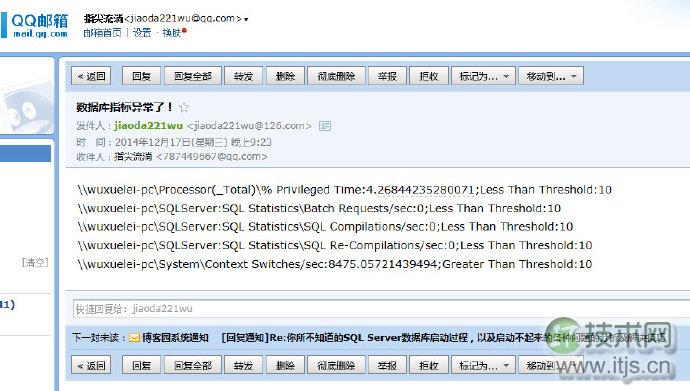
以上只提供实现方式,如需要内容更新,自己灵活更新。
脚本下载地址http://files.cnblogs.com/zhijianliutang/DBALter.zip
郑重申明:某某网络以外的任何单位或个人,不得使用该案例作为工作成功展示!